WordPress security for Plesk
Block known WordPress exploits before they reach your site
WordPress threats move fast. In July 2026, attackers began targeting a critical WordPress core vulnerability just 90 minutes after the security update was released, according to Patchstack. That gap matters. An exploited vulnerability can mean malware, downtime, stolen data and an expensive clean-up before you've even had time to safely test and deploy the update.
WP Guardian closes that gap automatically with a virtual patch, often before the vendor has even released a fix.
From £4/month per site, down to £1.56 across a portfolio. Full pricing tiers ↓
Not sure where to start? Start with your highest-risk site, then add more once it's proven itself.
Time to first exploit
Attacks can begin within 90 minutes of a vulnerability becoming public. WP Guardian automatically applies a virtual patch, closing the gap between disclosure and a safe update.

Who it's for
Built for the person keeping WordPress patched, and everything else
WP Guardian is for agencies and site owners who manage WordPress through Plesk and cannot drop everything to test and apply an update the moment a vulnerability is disclosed. It is the layer that holds while you decide when to update, not a replacement for updating.
- You manage WordPress sites through Plesk, for yourself or for clients
- A vulnerability notice does not always mean you can safely update right away
- You want known exploits covered without racing every disclosure
How does WP Guardian work?
Three steps, and the third one is the part that actually protects you
Connect
Installs the agent that links your Plesk server to WP Guardian.
Detect
Scans every WordPress site on that server for vulnerable plugins, themes and core.
Protect
Blocks the known exploit with a virtual patch, or applies the update if you've set it to.
You can see vulnerabilities across all your WordPress sites, regardless of how many WP Guardian licences you have. Protection is limited by your licence count. For example, if you have 10 sites and 5 licences, all 10 are scanned for vulnerabilities, but you choose which 5 have Vulnerability Protection (virtual patching) enabled.
One product, two different jobs
Built for the portfolio. Built for the one site that matters
Whether you're covering forty client sites or the one that runs your business, WP Guardian solves the same underlying problem: closing the gap between disclosure and patch. The payoff just looks different depending on which side of that you're on.
| For agencies | For businesses |
|---|---|
| Per-site cost drops from £4 to £1.56 as you scale | No more choosing: exposed plugin, or risky live update |
| Bulk updates across every site, not one login at a time | No security expertise needed, protection is automatic |
| Fewer hacked-site emergencies eating into billable hours | Protects what matters: revenue, reputation, search rankings |
| Visibility you can show clients: what's vulnerable, what's covered | Runs quietly in the background, nothing to babysit |
| One dashboard instead of forty logins | From £4/month, far less than a hacked-site cleanup |
Why the gap matters
Why the time between disclosure and patch is the riskiest part
Patchstack's State of WordPress Security in 2026 report recorded 11,334 new WordPress ecosystem vulnerabilities in 2025, roughly one new vulnerability every 46 minutes. For serious vulnerabilities, attackers do not wait. Patchstack has tracked critical flaws being exploited within 90 minutes of disclosure. The median time to mass exploitation for heavily exploited vulnerabilities is 5 hours, and around half of high-impact vulnerabilities are exploited within 24 hours.
- WordPress core
- WordPress 7.0.2, July 2026: Patchstack recorded the first real exploitation attempts about 90 minutes after release, and blocked over 65,000 exploitation attempts from more than 1,500 IP addresses in the days that followed.
- Plugin example
- OttoKit / SureTriggers: exploitation attempts began 91 minutes after the vulnerability was disclosed.
Source: Patchstack's State of WordPress Security in 2026 report and Patchstack's public vulnerability database.
That gap shows up as a real decision, not an abstract risk:
- A vulnerability scan flags a plugin with no fix released yet
- The available update has not been tested against a live, customised site
- A client's site cannot go down to test an update mid-week
- You are choosing between an exposed plugin and a risky update
None of those is a good choice on its own. WP Guardian gives you a third option: block the known exploit now, apply the real fix once it is safe to.
Updating eventually is not the same as covered now
Generic server defences were not built for WordPress-specific exploits
Standard hosting security catches a lot, but it isn't designed to recognise every WordPress-specific vulnerability. In a Patchstack test of 11 WordPress vulnerabilities across 5 hosting environments, 87.8% of exploit attempts got past the existing defences. Two environments stopped none at all, and even the best-performing setup blocked only 4 of 11. WP Guardian is designed to close that specific gap. Without it, every new vulnerability disclosure puts you back into the same loop:
The reactive vulnerability update cycle
- Disclosure
- Investigate
- Scramble to test the update
- Repeat
Every cycle through that loop is either a rushed update on a live site, or an exposed plugin left running while you find the time.
How it actually works
What a virtual patch actually blocks
WP Guardian does not rewrite your plugin or wait for you to update it. It recognises the known exploit pattern associated with the vulnerability and blocks matching requests. The plugin itself stays exactly as it is until you choose to update it.
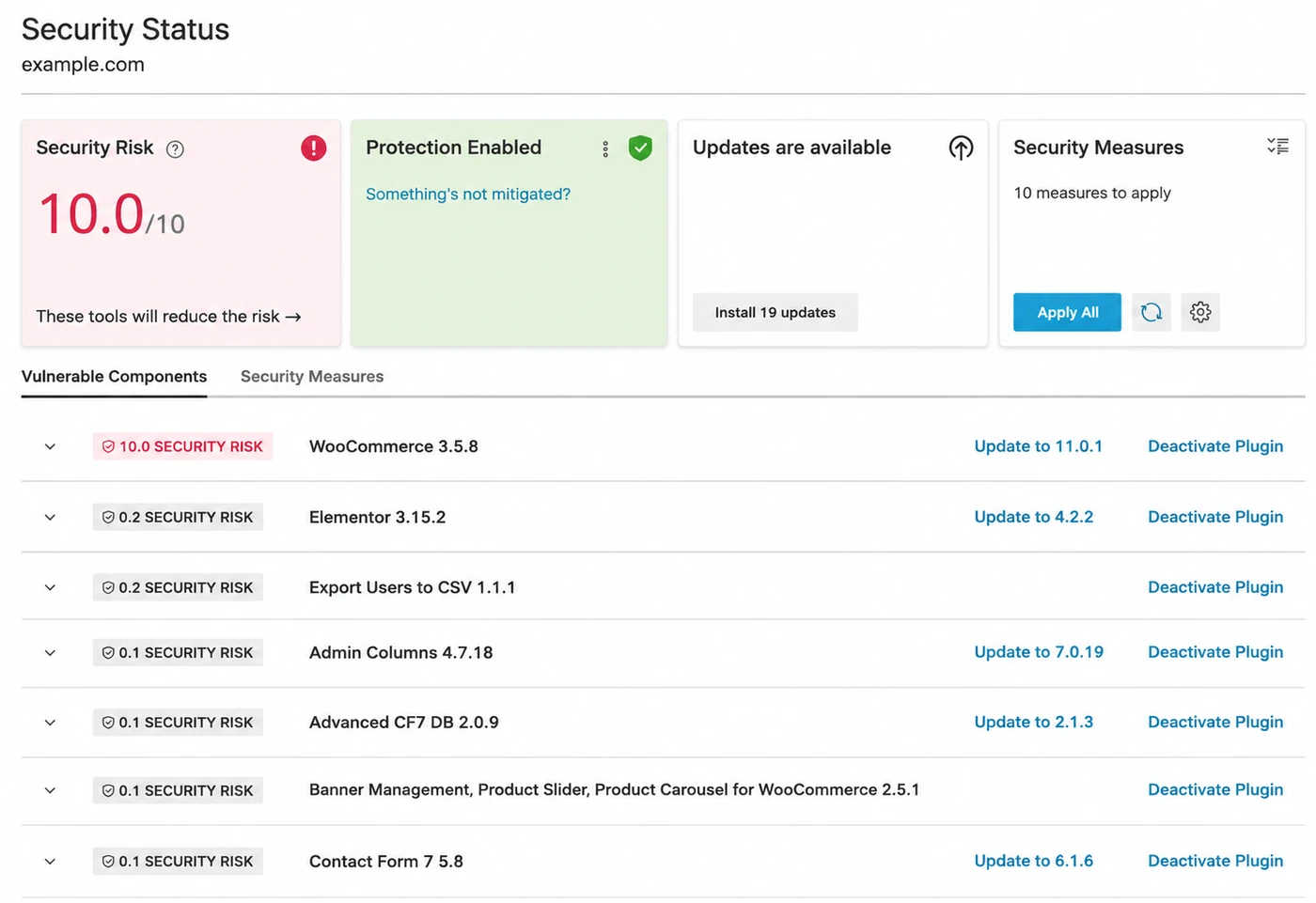
The Security Status view shows you exactly where you stand: your risk score, which plugins are vulnerable, how severe each vulnerability is, and the actions available to fix it, including updating or deactivating the affected plugin.
You can see the risk, the affected plugin and what to do next in one place.
What it actually does
Four things it covers, running quietly in the background
WP Guardian runs at the server layer for every WordPress site you manage through Plesk:
- Vulnerability Protection: blocks known exploit attempts in high and medium risk vulnerabilities automatically, without touching your site's code, so you are covered without lifting a finger
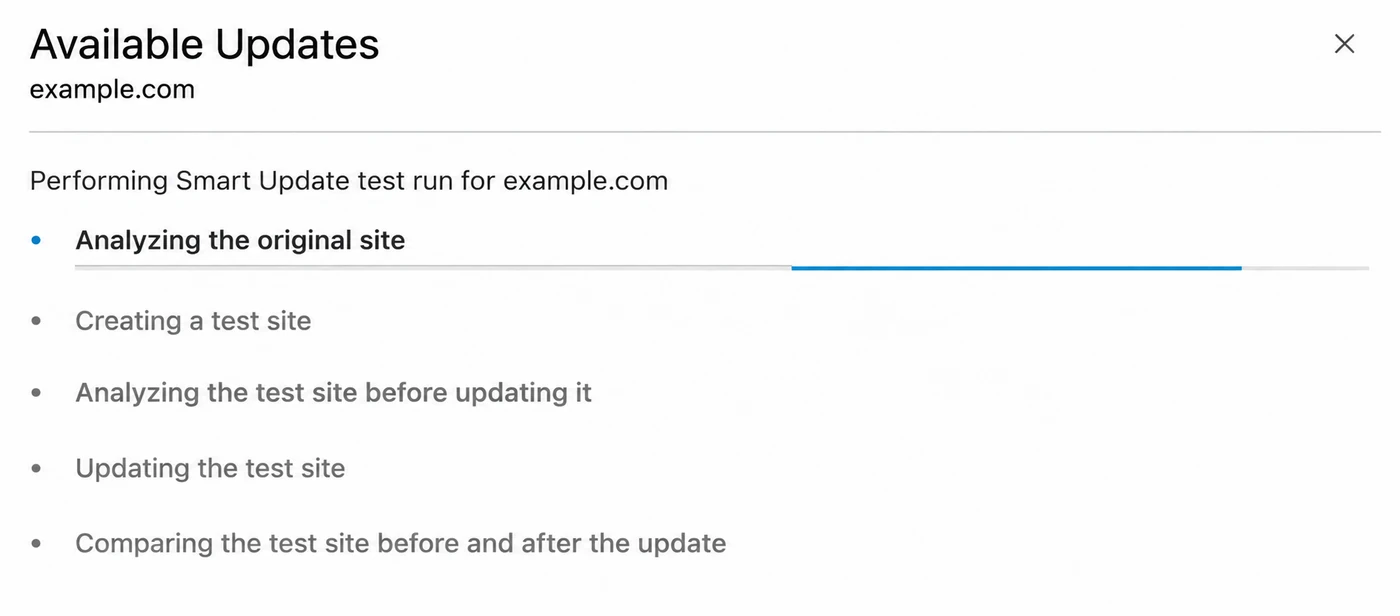
- Smart Updates: before a WordPress core, plugin or theme update runs, WP Guardian clones your site, applies the update to the clone, and checks for issues. The update only reaches your live site once you confirm it, or automatically if the test run found nothing wrong. You stop discovering a broken update from an angry client, and start discovering it on a clone nobody was using
- Smart PHP Updates: run a compatibility check directly on your live site, without changing anything, to see whether switching PHP versions would need a code change before you commit to it, so upgrading PHP stops being a guess
- Continuous monitoring, not a one-off scan you have to remember to rerun
Kept current
Vulnerability intelligence updated continuously, not on schedule
WP Guardian draws on continuously updated vulnerability intelligence from Patchstack and Wordfence, two of the most established vulnerability databases in WordPress.
- Same-day coverage: protection for a newly disclosed vulnerability lands the day it's published, not whenever the next scheduled scan happens to run
- Sometimes ahead of disclosure: Patchstack can mitigate certain vulnerabilities up to 48 hours before they're made public
- Runs alongside what you already have: server layer, before a request reaches WordPress, so it doesn't replace a security plugin, a firewall, or your own update process
- Closes one specific gap: the time between a vulnerability going public and the vendor's fix landing, which none of the above are built to close
Staying in control
Updating your plugins is still your call
Whatever WP Guardian blocks, three things you can count on:
Applying the real fix is your decision
A virtual patch buys you time. It does not update the plugin for you, and it does not stop you updating whenever you are ready.
Runs at the server layer, not inside WordPress
WP Guardian does not modify your plugin files, themes or database, which is why it runs with negligible performance impact and needs no code changes to your site.
Managed the way everything else on your VPS is
Turned on and off from inside Plesk. A question about something it flags goes to Layershift support, not a second vendor relationship.
What you get out of it
When the gap between disclosure and patch is covered
Day to day, that changes a few concrete things:
Known exploits blocked the day they are disclosed, not the day you get to them
Fewer "we need to update this right now" emergencies
Visibility into every vulnerable plugin and theme across every site you manage
Runs quietly in the background, with negligible performance impact
And you can see what's covered
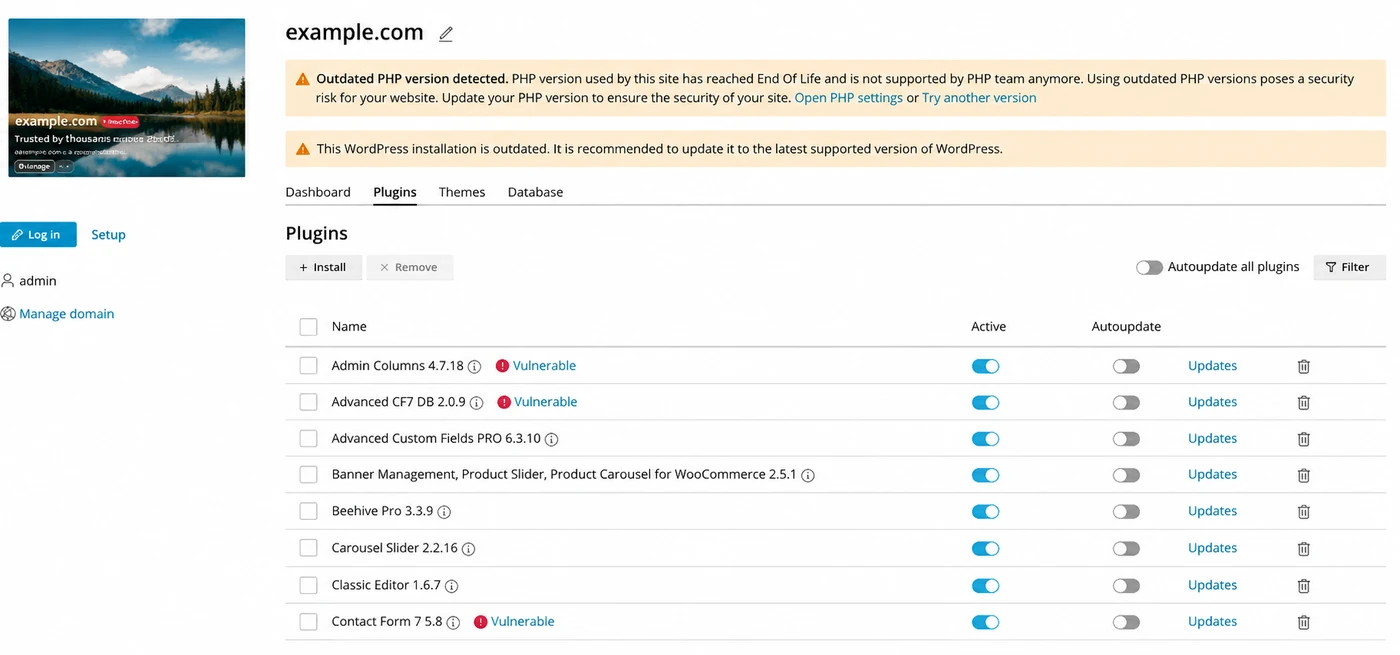
WP Guardian's reporting shows which plugins and themes are vulnerable and what has been virtually patched, so protection is not something you take on faith.
The word for all of that is
covered
You stop finding out about a vulnerable plugin from a hacked site, and start finding out from a dashboard, before it becomes an incident that damages your business or reputation.
Pricing
Clear pricing, lower cost per site as you grow
Bulk discounts are built in. Billed monthly, cancel anytime.
| Sites | Monthly price | Per-site cost |
|---|---|---|
| 1 | £4.00 | £4.00 |
| 5 | £11.75 | £2.35 |
| 10 | £19.50 | £1.95 |
| 20 | £35.00 | £1.75 |
| 30 | £50.50 | £1.68 |
| 50 | £77.75 | £1.56 |
| 50+ | Contact us for a quote → | |
Priced per site, not per server, so cost tracks what you're actually protecting.
Getting WP Guardian: the fastest way
Click Try one site for £4/mo, log in and choose your VPS. Then select the licence tier that covers the number of sites you want to protect. For example, if you're protecting 3 sites, choose the 5-site tier. WP Guardian is then applied directly to your server.
Already in Plesk?
When you view your website in Plesk, you can activate WP Guardian directly from the Security section by enabling Vulnerability Protection and following the on-screen instructions.
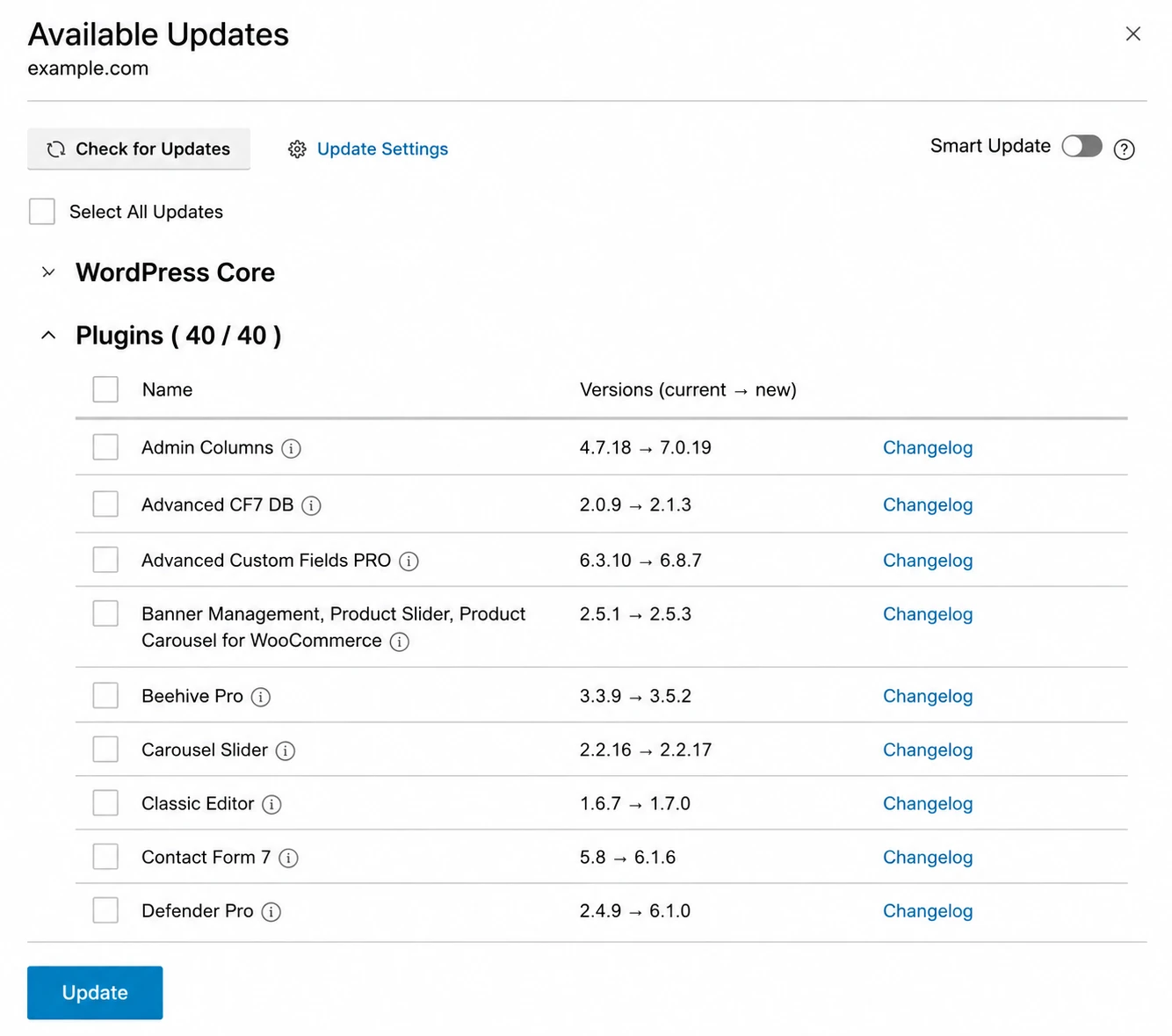
Available on Plesk Web Pro and Web Host editions. If Vulnerability Protection is not offered on your current plan, our support team can check and adjust it for you.
Still weighing it up? Talk to us firstFrequently asked questions
Questions, answered
Pick the area you are weighing up, or just scan the lot. Most questions land on how it works, how much control you keep, and licensing.
Who is WP Guardian for, and how do I get it?
It is a security add-on for WordPress sites managed through Plesk. If you already have a Layershift Managed VPS, you can turn it on for any site by enabling Vulnerability Protection in WP Toolkit, in about two minutes. If you're not on a Managed VPS yet, talk to us first.
How is this different from a WordPress security plugin?
WP Guardian operates at the server layer, before a request ever reaches WordPress, rather than working from inside WordPress the way a plugin does. That means it keeps blocking a known exploit even for a plugin you have not been able to update yet, without needing to touch WordPress itself.
Does virtual patching mean I do not have to update my plugins?
No. A virtual patch blocks the known exploit while you wait; it does not replace the vendor's update. If the plugin author has not released a fix yet, the virtual patch simply stays in place for as long as it takes, so you are not left exposed while you wait. Once an update is available, you test and apply it in your own time.
Will it slow down my site?
No. WP Guardian runs at the server layer with negligible performance impact, and it does not modify your plugin, theme or database files.
Do I need technical knowledge to set it up?
No. It is turned on from inside Plesk with a single switch and needs no coding or configuration.
Who do I contact if I have a question about something WP Guardian flags?
Us. WP Guardian is an add-on we provide as your host, so anything to do with it goes to Layershift support in the usual way.
How much time does this actually save for an agency managing multiple sites?
Enough to notice. Patchstack, the vulnerability intelligence behind WP Guardian's virtual patching, published a case study with a hosting provider running this same protection for its customers: over 15 hours of support workload saved weekly, because vulnerabilities were mitigated before they turned into customer-facing incidents. That's a third-party hosting deployment's result, not a Layershift-measured figure, but it's a reasonable proxy for what fewer "site's been hacked" emergencies are worth across a portfolio.
I only run one WordPress site for my business. Is WP Guardian overkill?
No. The problem doesn't scale down: a single vulnerable plugin can still take your one site offline, and the choice between updating immediately on a live, revenue-generating site or waiting while exposed is the same choice whether you run one site or forty. At £4 a month for a single site, it's priced for exactly that case.
Does WP Guardian only scan the sites I'm paying for?
No. Detection isn't limited by your licence. WP Guardian scans every WordPress site on a connected server for vulnerabilities, including ones beyond your current plan, so you can see what's exposed across your whole portfolio. Virtual patching and updates only apply to sites within your licensed count; sites beyond that show up as "unmanaged" with their vulnerabilities still visible, until you add them to your plan.